
A BinaryLane VPC includes a route table: a list of entries that tell the VPC network "to reach destination X, hand the traffic to server Y". This is how you reach a network that sits behind one of your servers - a VPN tunnel, a container overlay, or an office LAN - from every other server in the VPC, without configuring a route on each one individually.
Route entries are powerful, and they are applied by the VPC network itself rather than by your server. That combination is why they are easy to misdiagnose: the symptom appears on one server, but the cause is in the VPC configuration, and nothing in your server's own routing table will mention it.
This guide explains how VPC route entries actually behave, how to add one correctly, and how to identify each of the common failure modes from its symptoms.
Warning: Route-table changes can immediately interrupt internet access and SSH for VPC servers in NAT mode. Before adding, changing or removing a route entry, ensure you can access mPanel to reverse the change and have an alternate access path for any private-only server.
Prerequisites:
- A BinaryLane account with a VPC containing at least two servers
- Root or sudo access to the servers involved
- Familiarity with basic Linux command-line networking (
ip,ping,traceroute)
TABLE OF CONTENTS
- 1. Where your default route points
- 2. Route entries live in the VPC, not in your server
- 3. Adding a route entry correctly
- 4. What route entries can and cannot do
- 5. The default route, and what is genuinely dangerous
- 6. Diagnostic commands that actually tell you something
- 7. Failure signatures at a glance
- 8. Recovering a server that has lost connectivity
- Related articles
1. Where your default route points
Before troubleshooting anything, establish which networking mode the server is in, because it determines whether a VPC problem can affect your public connectivity.
NAT mode (the default)
In NAT mode the server has one interface carrying only its private VPC address. The public IP is not configured inside the server at all - when a server is given an external IP, the platform provides a virtual router that handles internet access for it. On a server with private address 10.99.0.4:
ip -br addr
lo               UNKNOWN        127.0.0.1/8 ::1/128
eth0             UP             10.99.0.4/16 fe80::216:3eff:fee9:e138/64
ip route
default via 10.99.0.1 dev eth0 proto static
10.99.0.0/16 dev eth0 proto kernel scope link src 10.99.0.4
The default route points at 10.99.0.1 - the VPC gateway. A traceroute to the internet confirms that public traffic transits the VPC network before it reaches the public gateway:
traceroute -n 8.8.8.8
1  10.99.0.1        <-- VPC gateway
2  112.213.33.1     <-- public gateway
3  10.76.0.2
Important: In NAT mode, the VPC network path carries all of your traffic, public traffic included. A route entry that captures internet-bound destinations will therefore take the server off the internet - including your SSH session. This is a common cause of an unexpected outage after a route table change.
The MTU on this interface is set to 1450 by cloud-init, to allow for encapsulation overhead. See Why do I need to adjust the MTU size for servers within a VPC?
This changes the moment a server joins a VPC
If you are used to servers that are not in a VPC, the above will look wrong - because on a standalone server the public IP is configured on the interface, exactly as you would expect:
                    Standalone server              Server in a VPC
eth0 address        45.124.52.143/24  (public)     10.99.0.4/16  (private)
default route       via 45.124.52.1   (public gw)  via 10.99.0.1 (VPC gw)
MTU                 1500                           1450
Both of the servers above were built in the same region two days apart from the same image. The only difference between them is VPC membership.
This catches people out: nothing about the server's public IP changes from the outside - it remains reachable on the same address, and outbound traffic still appears to come from it - but inside the operating system the address is simply gone, and the default route now belongs to the VPC. Any assumption in your configuration or scripts that reads the public IP off eth0 will stop working when the server is added to a VPC.
This is long-standing behaviour, not a recent change: servers placed in VPCs in 2024 show the same arrangement.
Dedicated Interface mode (also called Split NIC)
This mode is labelled differently depending on which interface you are using:
| Interface | How the setting is labelled |
|---|---|
| Current mPanel | Dedicated Interface (Public IP traffic is on a dedicated interface) |
| Classic mPanel | Configure Cloud Server with two separate NICs: one for public internet access, and one for VPC |
Both do the same thing. Older documentation may also call it Split NIC.
With Dedicated Interface selected the server receives two interfaces: a public one carrying the public IP, and a separate private one for VPC traffic. The default route moves to the public gateway:
default via 112.213.33.1 dev eth0 proto static
112.213.33.0/24 dev eth0 proto kernel scope link src 112.213.33.206
10.99.0.0/16 dev ens4 proto kernel scope link src 10.99.0.4
Here the public and VPC paths really are independent, and a VPC route entry cannot take the server off the internet. That safety comes with two trade-offs described below.
Important: the private interface is not configured automatically.

After switching to Dedicated Interface, the second interface is present but down and without an address. Cloud-init does not configure it, including after a reboot. Configure the private interface before expecting VPC connectivity.
The server remains listed as a VPC member in mPanel while having no VPC connectivity:
ip -br addr
eth0             UP             112.213.33.206/24
ens4             DOWN
ping 10.99.0.5
3 packets transmitted, 0 received, 100% packet loss
The private interface name can differ between server images. Run ip -br link to identify the interface that is down and has no address, then substitute that interface name for ens4 in the examples below. Configure the private interface with the VPC address shown in mPanel.
To test:
sudo ip addr add 10.99.0.4/16 dev ens4
sudo ip link set ens4 up
To persist it, add ens4 to /etc/netplan/50-cloud-init.yaml:
network:
  version: 2
  ethernets:
    ens4:
      addresses:
        - "10.99.0.4/16"
Then run sudo netplan apply.
Note: VPC membership in mPanel is not evidence of working VPC connectivity. Always confirm it from inside the server.
Route entries do not take effect automatically in Dedicated Interface mode. Because the server's default route now points at the public gateway, traffic for a routed destination leaves via the public interface and never reaches the VPC network, so no redirect is ever issued:
ip route get 192.168.50.1
192.168.50.1 via 112.213.33.1 dev eth0 src 112.213.33.206     <-- wrong path
Add a matching static route on each server that needs it, pointing at the VPC gateway:
sudo ip route add 192.168.50.0/24 via 10.99.0.1 dev ens4
ping 192.168.50.1
2 packets transmitted, 2 received, 0% packet loss
Pointing at the VPC gateway (10.99.0.1) rather than at the router server's own address keeps the VPC route table as the single source of truth - if you later change which server is the router, the guests do not need editing.
Which mode am I in?
| NAT (default) | Dedicated Interface | |
|---|---|---|
| Public IP visible inside the server | No | Yes |
| Default route points at | VPC gateway | Public gateway |
| Route entries apply automatically | Yes, via ICMP redirect | No, add a static route |
| A bad route entry can break internet access | Yes | No |
| Private interface configured automatically | Yes | No |
2. Route entries live in the VPC, not in your server
This is the point that causes most wasted troubleshooting time. The behaviour described in this section is what you see in NAT mode; for Dedicated Interface see section 1.
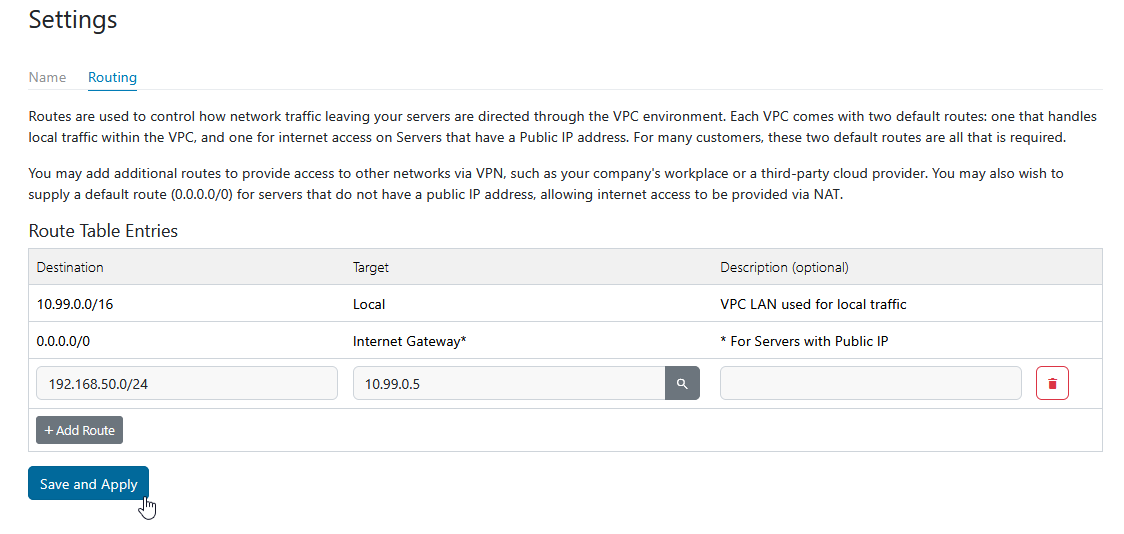
Adding a route entry does not change your server's routing table. Suppose you add an entry sending 192.168.50.0/24 to the server at 10.99.0.5. On another VPC server, the routing table is completely unchanged:
ip route
default via 10.99.0.1 dev eth0 proto static
10.99.0.0/16 dev eth0 proto kernel scope link src 10.99.0.4
There is no mention of 192.168.50.0/24. The traffic still matches the default route to the VPC gateway. The gateway then replies with an ICMP redirect telling the server to send that traffic directly to 10.99.0.5:
ping 192.168.50.1
From 10.99.0.1: icmp_seq=2 Redirect Host(New nexthop: 10.99.0.5)
The server caches that redirect for about five minutes:
ip route get 192.168.50.1
192.168.50.1 via 10.99.0.5 dev eth0 src 10.99.0.4
cache <redirected> expires 221secImportant:ip routewill not show your VPC route entries. Useip route get <destination>instead. On current Linux systems,ip route show cachedoes not list IPv4 route-cache entries. A route entry that is working correctly appears as a<redirected>result fromip route get, not as a table entry.
3. Adding a route entry correctly
Three separate things must all be true. A route entry on its own does nothing.
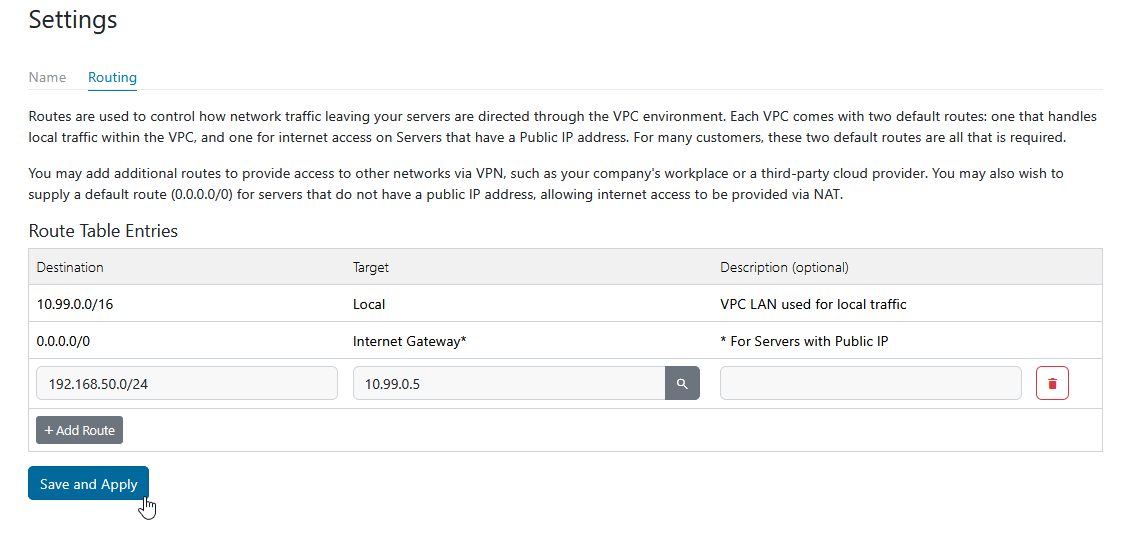
Step 1 - Add the entry to the VPC route table. In mPanel, open the VPC and add a route entry with the destination network and the private IP of the server that will act as the router.
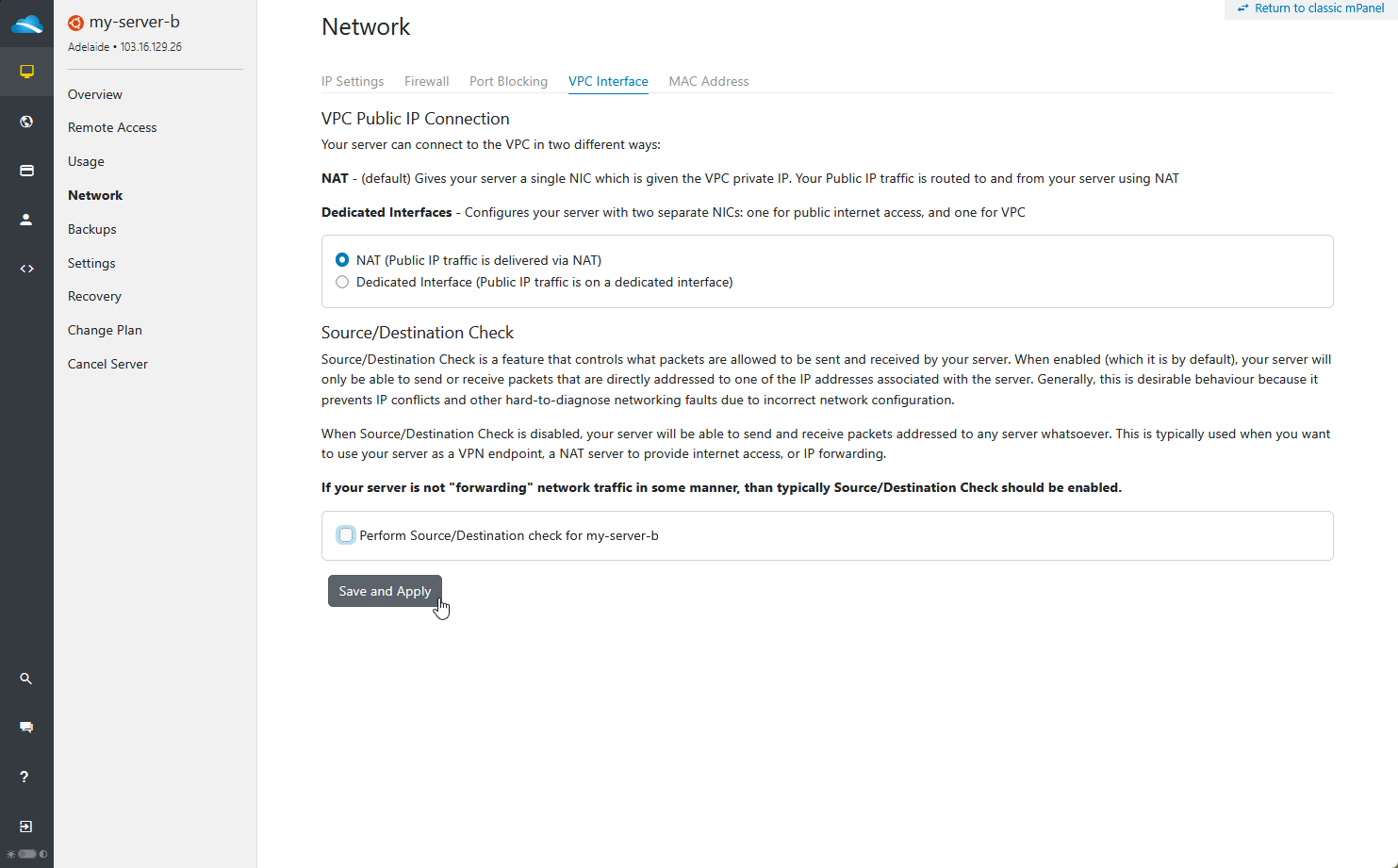
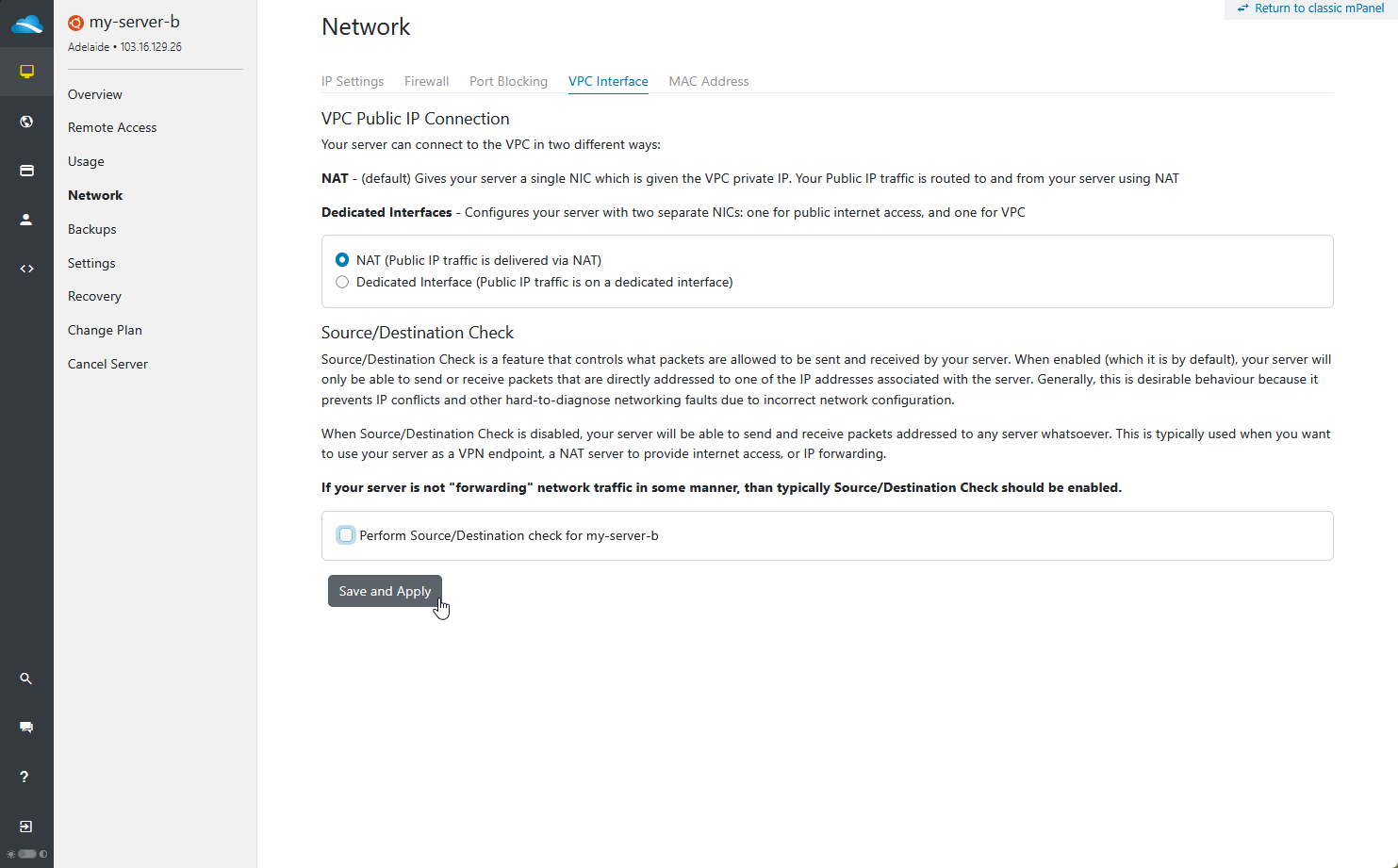
Step 2 - Disable Source/Destination Check on the router server. By default every server has Source/Destination Check enabled, which permits it to send and receive only packets addressed to one of its own IP addresses. A router forwards traffic addressed to somewhere else, so this check must be turned off on the router server. It is found under Network → VPC Interface, and mPanel describes the reason for disabling it directly:
"When Source/Destination Check is disabled, your server will be able to send and receive packets addressed to any server whatsoever. This is typically used when you want to use your server as a VPN endpoint, a NAT server to provide internet access, or IP forwarding."
Leave it enabled on every server that is not forwarding traffic.
The screen names above are from the current mPanel. If you are using the classic interface - still available via the "Return to classic mPanel" link - both this setting and the Dedicated Interface option are found together under the server's Source/Dest Check settings instead.
This is a common reason a correct-looking route entry does nothing at all. With the check enabled, the VPC gateway still issues the redirect, but the traffic never reaches the router server - tcpdump on the router shows zero packets and the sender sees 100% loss.
The setting applies immediately and does not require a reboot.
Step 3 - Enable IP forwarding on the router server.
sudo sysctl -w net.ipv4.ip_forward=1
To persist it across reboots:
echo "net.ipv4.ip_forward = 1" | sudo tee /etc/sysctl.d/99-ip-forward.conf
Verify. From another server in the VPC:
ping 192.168.50.1
64 bytes from 192.168.50.1: icmp_seq=1 ttl=64 time=0.623 ms
64 bytes from 192.168.50.1: icmp_seq=2 ttl=64 time=0.755 ms
And on the router server, tcpdump should show the traffic arriving and being answered:
sudo tcpdump -ni eth0 host 192.168.50.1
IP 10.99.0.4 > 192.168.50.1: ICMP echo request, id 1878, seq 1, length 64
IP 192.168.50.1 > 10.99.0.4: ICMP echo reply,   id 1878, seq 1, length 64
4. What route entries can and cannot do
A route entry only works if the router server can reach the destination by some path other than the VPC network.
| Destination | Works? |
|---|---|
A network behind a VPN/WireGuard tunnel on the router (wg0, tun0) | Yes |
| A container or overlay subnet local to the router | Yes |
| A LAN on a second interface of the router | Yes |
| A public internet prefix, from a server with a public IP | No - see below |
The whole internet via 0.0.0.0/0, from a server with no public IP | Yes - this is the intended NAT pattern |
The last two rows are the ones that catch people. Routing internet traffic to a NAT gateway server is a supported design - but it relies on the servers being routed using the 0.0.0.0/0 entry and having no public IP of their own, so that the gateway server keeps using the built-in Internet Gateway route for its own traffic. Point a more specific prefix at that same gateway and you break the arrangement, because the gateway server is then subject to the entry as well.
The reason is that route entries apply to every server in the VPC, including the router server itself. If you point an internet destination at a VPC member, that member also receives the instruction "to reach this destination, send it to yourself". Its traffic is sent back to the VPC gateway, which sends it to the router, which sends it back to the gateway - a routing loop.
Tested directly: with entries pointing two public addresses at server 10.99.0.5, that server could no longer reach them, while an address with no entry was unaffected:
8.8.8.8         (no route entry)   2 packets transmitted, 2 received, 0% packet loss
104.26.12.205   (entry -> itself)  2 packets transmitted, 0 received, 100% packet loss
104.26.13.205   (entry -> itself)  2 packets transmitted, 0 received, 100% packet loss
From another server, the same misconfiguration shows the loop explicitly - the two routers each redirecting to the other until the packet expires:
From 10.99.0.5: icmp_seq=2 Redirect Host(New nexthop: 10.99.0.1)
From 10.99.0.1: icmp_seq=2 Redirect Host(New nexthop: 10.99.0.5)
From 10.99.0.1  icmp_seq=3 Time to live exceeded
Important: A router server is always subject to its own route entries. If you point a prefix at a VPC member and that member has no other way to reach the destination, it will route the traffic back to the VPC and loop. This is why NAT egress is built around 0.0.0.0/0 and servers without public IPs: the gateway server's own traffic stays on the built-in Internet Gateway route, so it never becomes subject to the entry. If you try to achieve the same thing with a more specific prefix, you break the gateway itself.5. The default route, and what is genuinely dangerous
Every VPC starts with two routes already in the table, which mPanel shows above any entries you add:
| Destination | Target | |
|---|---|---|
10.99.0.0/16 | Local | VPC LAN used for local traffic |
0.0.0.0/0 | Internet Gateway | For servers with a public IP |
Understanding these two is most of the battle, because your entries compete with them, and the more specific prefix wins.
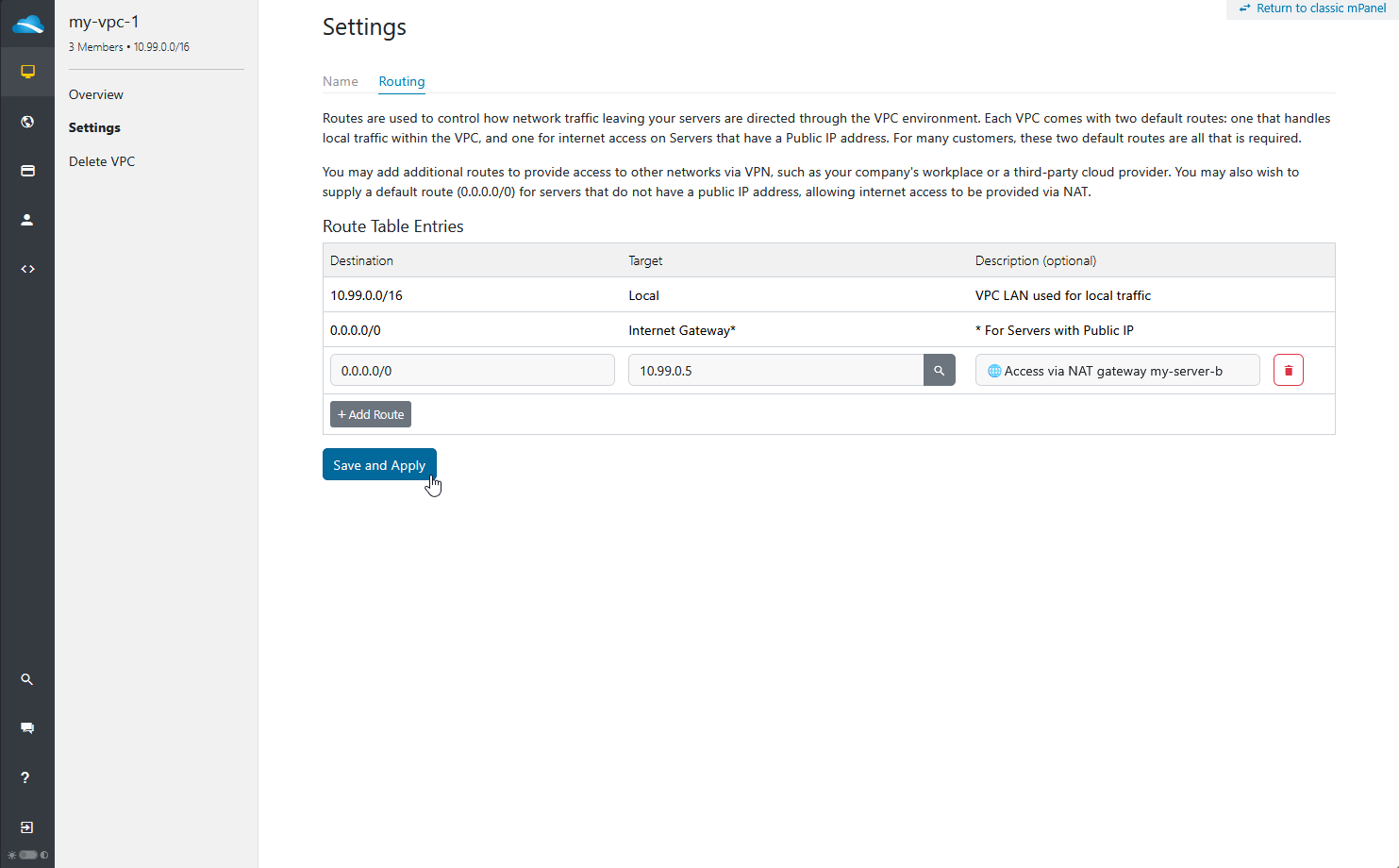
Adding your own 0.0.0.0/0 - internet access via a NAT gateway
Adding a 0.0.0.0/0 entry of your own is a supported operation, intended for servers that have no public IP, so they can reach the internet through another server acting as a NAT gateway.
On a server that does have a public IP, adding 0.0.0.0/0 appears to do nothing - the built-in Internet Gateway route continues to carry its traffic, no redirect is issued, and internet access is unaffected. That is the two routes tying on specificity and the built-in one taking precedence, not the entry being rejected.
This is what makes the NAT gateway pattern work. The gateway server has a public IP, so it keeps using the built-in route for its own traffic and never becomes subject to the entry pointing at it. Servers with no public IP have no built-in route to tie against, so they follow your entry. The result is a working NAT gateway with no routing loop - the failure described in section 4 does not occur here.
Windows KMS exception: A customer-managed NAT gateway can provide general internet access, but it cannot be used to reach BinaryLane Windows KMS servers. Windows VPSs using this design require Dedicated Interface (Split NIC) mode and a specific route to the applicable KMS address through the BinaryLane public interface. See BinaryLane mPanel service IPs.
Setting it up
- Create the private servers with no public IPv4. In mPanel, give each server only an address from your VPC range. These servers are unreachable from the internet, so plan access first through a bastion host or VPN.
- On the gateway server (which does have a public IP), disable Source/Destination Check, enable forwarding, and add a masquerade rule.
sudo sysctl -w net.ipv4.ip_forward=1
echo "net.ipv4.ip_forward = 1" | sudo tee /etc/sysctl.d/99-ip-forward.conf

sudo nft add table ip nat
sudo nft 'add chain ip nat postrouting { type nat hook postrouting priority 100 ; }'
sudo nft add rule ip nat postrouting ip saddr 10.99.0.0/16 oifname "eth0" masquerade
Persistence: These commands are a temporary test and may not survive a reboot. Before relying on this gateway permanently, configure and test persistent firewall rules using the method appropriate to your operating system. Do this during a maintenance window so you can confirm private servers retain outbound access after a restart.
- Add the route entry: set the destination to
0.0.0.0/0and the router to the gateway server’s private IP.
Once saved, the route table will list two entries with a destination of 0.0.0.0/0 - the built-in Internet Gateway route and the one you just added. This is expected and is not a duplicate or a conflict. They serve different servers:
| Route | Applies to |
|---|---|
0.0.0.0/0 → Internet Gateway (built-in) | Servers that have a public IP |
0.0.0.0/0 → your gateway server | Servers that do not |
Verifying it
Measured on a three-server VPC. my-server-c has no public IP; my-server-b (10.99.0.5, public 103.16.129.26) is the gateway.
Before adding the entry, the private server has no internet at all:
ping 8.8.8.8
3 packets transmitted, 0 received, 100% packet loss

curl https://api.ipify.org
                                  <-- no output
After adding 0.0.0.0/0 → 10.99.0.5:
ping 8.8.8.8
3 packets transmitted, 3 received, 0% packet loss

curl https://api.ipify.org
103.16.129.26                     <-- the gateway's public IP

curl -o /dev/null -w "%{http_code}" https://www.binarylane.com.au/
200

ip route get 8.8.8.8
8.8.8.8 via 10.99.0.5 dev eth0 src 10.99.0.6
    cache <redirected> expires 297sec
The two servers that do have public IPs are untouched by the same entry - each still egresses from its own address via the built-in route, with no redirect:
| Server | Public IP? | Egress address | Path |
|---|---|---|---|
my-server-a | Yes | its own, 112.213.33.206 | via 10.99.0.1, no redirect |
my-server-b | Yes (gateway) | its own, 103.16.129.26 | via 10.99.0.1, no redirect |
my-server-c | No | 103.16.129.26 (the gateway's) | via 10.99.0.5, redirected |
Important: Removing the entry takes the private servers offline immediately - that is their only internet path. Note also that the stale redirect cache does not keep them working: the cached next-hop remains, but the VPC no longer forwards for it, so traffic fails until the cache is flushed and the server correctly reports no route.
Important: This means testing a 0.0.0.0/0 entry on a server with a public IP will show you nothing, and is not evidence that the entry is wrong. Verify it from a server with no public IP.A server given only an internal IP is completely unreachable from the internet, by design. Before you rely on a 0.0.0.0/0 entry for its outbound access, make sure you can still get in - via a bastion (jump) host on the VPC, or a VPN. A server whose only inbound path was a route entry you are about to change is a server you can lock yourself out of.
Where it becomes dangerous
The built-in default only wins ties. Any prefix more specific than /0 overrides it - including on servers that have a public IP. Two entries are enough to cover the entire internet while both being more specific than the built-in route:
0.0.0.0/1     -> 10.99.0.5
128.0.0.0/1   -> 10.99.0.5
Between them these two entries match every IPv4 address. In testing, applying this pair took a server completely off the internet - SSH included - within about five seconds. The distinguishing symptom is that the VPC itself stays healthy:
12:39:48 internet_icmp=UP    vpc_gw=UP  peer=UP    <- healthy
12:39:53 internet_icmp=DOWN  vpc_gw=UP  peer=UP    <- entries applied
12:40:11 internet_icmp=DOWN  vpc_gw=UP  peer=UP
12:40:17 internet_icmp=UP    vpc_gw=UP  peer=UP    <- entries removed
The same applies to any prefix more specific than /0 - 0.0.0.0/2, 8.8.8.0/24, or even a /32 for a single public host. Each of these beats the built-in Internet Gateway route, and on a server that has a public IP the result is the loop described in section 4.
The distinction to hold on to:
| Entry | On a server with a public IP | On a server with no public IP |
|---|---|---|
0.0.0.0/0 → a VPC member | No effect (built-in route wins) | Intended use - internet via NAT |
| Anything more specific → a VPC member | Overrides the built-in route | Overrides it too |
Important: Treat any route entry whose destination is not a private network as a change that can take your servers offline. Because the loss of connectivity includes SSH, make the change when you have access to mPanel to reverse it.
Servers in Dedicated Interface mode are not affected by this. The same pair of entries applied to a Dedicated Interface server left its internet access completely untouched, because its default route does not point at the VPC gateway:
ping 8.8.8.8
3 packets transmitted, 3 received, 0% packet loss

ip route get 8.8.8.8
8.8.8.8 via 112.213.33.1 dev eth0 src 112.213.33.206
If you intend to use route entries at all heavily, Dedicated Interface is the safer mode to be in - at the cost of configuring the private interface and the static routes yourself.
6. Diagnostic commands that actually tell you something
Which path is this destination actually taking?
ip route get 8.8.8.8
A normal result in NAT mode goes via the VPC gateway. A result reading via <some VPC server> ... cache <redirected> means a route entry is capturing it.
Is the router IP a real, live VPC member?
ip neigh
10.99.0.1  dev eth0 lladdr 02:56:58:e9:e1:38 REACHABLE
10.99.0.5  dev eth0 lladdr 00:16:3e:e9:e1:39 STALE
10.99.0.99 dev eth0 INCOMPLETE                      <-- nothing at this address
INCOMPLETE means no server in the VPC holds that address. The route table will accept any address inside the VPC range whether or not a server is using it.
Is the traffic reaching the router server?
On the router server:
sudo tcpdump -ni eth0 host <destination>
Nothing at all means the traffic is being dropped before it arrives - check Source/Dest Check. The same packet appearing repeatedly within a millisecond means a routing loop:
12:38:41.689437 IP 10.99.0.4.59476 > 1.1.1.1.80: Flags [S], seq 2451172174 ...
12:38:41.689530 IP 10.99.0.4.59476 > 1.1.1.1.80: Flags [S], seq 2451172174 ...
12:38:41.689843 IP 10.99.0.4.59476 > 1.1.1.1.80: Flags [S], seq 2451172174 ...
Confirming an MTU problem rather than a routing problem. If small packets pass and large transfers stall, test the path MTU directly:
ping -M do -s 1422 10.99.0.5     # 1450 bytes total - should succeed
ping -M do -s 1423 10.99.0.5     # 1451 bytes total - should fail
ping: local error: message too long, mtu=1450
7. Failure signatures at a glance
| Symptom | Most likely cause |
|---|---|
No redirect; ip route get still shows the VPC gateway | Entry missing, destination not matching, or a 0.0.0.0/0 entry being tested on a server that has a public IP - the built-in Internet Gateway route wins |
| Redirect issued, but 100% loss and no packets on the router | Source/Dest Check still enabled on the router server |
Redirect issued, then Destination Host Unreachable; ip neigh shows INCOMPLETE | Router IP is not a live VPC member |
Redirect issued, Time to live exceeded, duplicate packets on the router | Destination is on the internet - routing loop (section 4) |
| Traffic reaches the router but gets no reply | net.ipv4.ip_forward is 0, or the router has no route to the destination |
| Internet is down but the VPC gateway and VPC peers still respond | A route entry is capturing internet traffic |
| Route entry removed, but one destination is still broken | Stale redirect cache - see below |
Route entry has no effect at all; ip route get shows the public gateway | Server is in Dedicated Interface mode - add a static route (section 1) |
| Servers cannot reach each other privately after switching to Dedicated Interface | Private interface is down/unconfigured (section 1) |
8. Recovering a server that has lost connectivity
If the server is unreachable, the fix is made from outside it. Route entries are VPC configuration, so you do not need to log in:
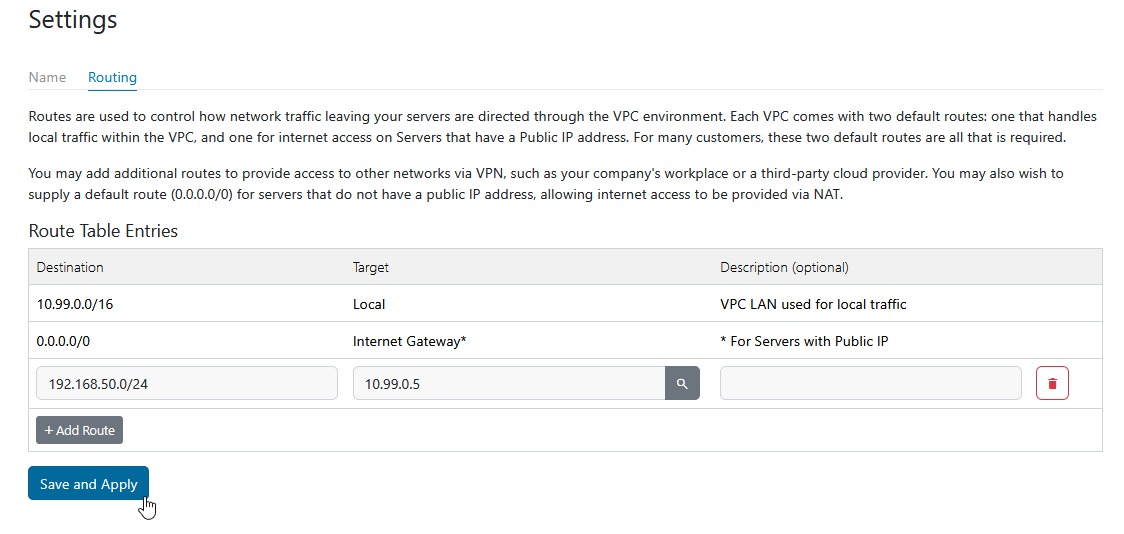
- Open the VPC in mPanel and remove the offending route entry, or all entries.
- Connectivity returns within about ten seconds. No reboot is required.
- If you cannot reach mPanel, use the VNC console, which reaches the server regardless of its network configuration.
If connectivity does not return for one particular destination, run ip route get <destination> and confirm it no longer shows via <router> ... cache <redirected>. If it still does after mPanel shows the entry removed, wait for the redirect to expire or contact support with that command output.
Related articles
- What is a VPC? Do I need one?
- Why do I need to adjust the MTU size for servers within a VPC?
- Netplan IP Configuration for Ubuntu / Debian
If you require assistance, submit a support ticket.