
Use the BinaryLane API to read account information and automate server management. This guide takes you through creating an access token and listing your servers without changing them. You do not need to write a Python program.
Keep your API token secure
Access tokens are like passwords and should be kept secure. API access allows programmatic control of your account, including destructive actions such as deleting servers and data. Actions performed via the API are immediate and may not be reversible. The read-only examples here do not make your token read-only. See Does BinaryLane support scoped API tokens?.
TABLE OF CONTENTS
- Before you begin
- Applies to
- Create an API token
- List your servers with the CLI
- Make a direct API request
- Understand the response
- Troubleshooting
- Next steps
Before you begin
You need a BinaryLane account, access to mPanel and a terminal on your computer. Choose the CLI route below for ready-made commands, or the direct API route to work with HTTP requests and JSON responses. You only need to follow one route.
Applies to
- BinaryLane API v2.
binarylane-cli0.21.0 for the CLI examples.- Bash with curl for the Linux/macOS direct-request example, or PowerShell 5.1 or later on Windows.
Create an API token
- Sign in to Developer API in mPanel. Check that you are using the intended account.
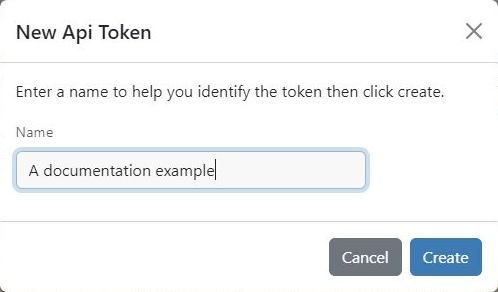
- Select + Create Token, give the token a name that identifies its purpose, then select Create.
- Copy the token when it is displayed. The full token is shown only once. Keep it secure and use it in your chosen route below.
Do not include tokens in scripts, screenshots, support messages or version control. If a token may have been exposed, replace it in mPanel and update the tools that use it.
List your servers with the CLI
Install the CLI using the BinaryLane CLI installation instructions. Then run:
bl configurePaste your token at the prompt. Avoid screen sharing or recording while doing this: the prompt may display the token. The CLI saves its configuration locally for subsequent commands.
Check the account, then list its servers:
bl account get
bl server list
Confirm that the account details and server names are the ones you expect. Keep the output private. These commands read information; they do not create, restart or change servers.
For multiple accounts, see Manage multiple BinaryLane accounts with the CLI. If you already use the BL_API_TOKEN environment variable, it overrides the token saved by bl configure.
Make a direct API request
The API accepts requests over HTTPS at https://api.binarylane.com.au. Send your token in the Authorization: Bearer header. The examples request the first page from GET /v2/servers, with up to 20 servers.
Linux and macOS: Bash and curl
Open Bash (run bash first if your terminal uses another shell). Enter this line, then paste your token at the hidden prompt and press Enter:
read -r -s -p 'API token: ' BINARYLANE_API_TOKEN; printf '\n'
export BINARYLANE_API_TOKEN
Make the request:
curl --fail --silent --show-error --connect-timeout 10 --max-time 30 \
  -H "Authorization: Bearer ${BINARYLANE_API_TOKEN}" \
  'https://api.binarylane.com.au/v2/servers?page=1&per_page=20'
curl displays the JSON response. If you have jq installed, append | jq '.servers[] | {name, status}' to display only names and statuses. This filters the returned page, not every server in the account.
When you have finished, remove the token from this shell's environment:
unset BINARYLANE_API_TOKENWindows: PowerShell
Read the token without displaying it, then make the request:
$token = Read-Host 'API token' -AsSecureString
$credential = [System.Net.NetworkCredential]::new('', $token)
$headers = @{ Authorization = 'Bearer ' + $credential.Password }
$response = Invoke-RestMethod -Uri 'https://api.binarylane.com.au/v2/servers?page=1&per_page=20' -Method Get -Headers $headers -TimeoutSec 30
$response.servers | Select-Object name, status
PowerShell converts the JSON into an object. The server entries are in $response.servers, not directly in $response. To inspect the page metadata, run $response.meta and $response.links.
When you have finished, remove the variables containing credentials:
Remove-Variable token, credential, headersHidden input prevents the token appearing as you enter it; it does not make a compromised computer safe. The request needs the token in readable form. Removing variables does not revoke the token in mPanel.
Understand the response
A successful server-list request returns JSON with a servers array and meta information. Each server includes fields such as id, name and status. JSON is the structured format used to exchange this information.
The direct examples above retrieve page 1 only. Compare the returned entries with meta.total and check the pagination links. To request another page, change page=1 to page=2, and continue as needed. The API allows up to 200 results per page. To get only a count, set per_page=0 (for example /v2/servers?per_page=0): the list in the response is empty and meta.total gives the number of items, so an empty list is expected with per_page=0 even when the account has servers. An empty first page with a total of zero can be a successful response for an account with no servers.
The API reference documents each operation's method, parameters and response fields. It also carries the developer-preview warning about possible breaking changes without a version change; consult it when building or maintaining integrations.
Troubleshooting
- 401 Unauthorized: check that you supplied the correct token, without extra spaces, and that it has not been revoked. Do not print it to check. For the CLI, run
bl configureagain and check for aBL_API_TOKENoverride. - Unexpected or missing servers: check the account used to create the token and the requested page. A successful request does not prove that you selected the intended account.
- Connection or certificate error: check the URL and your computer's network connection and clock. Do not disable certificate verification to work around an error.
- Command not found: confirm that the tool for your chosen route is installed and available in your terminal. jq is optional.
Next steps
Once you can read your account's information, choose a guide for the task you want to automate:
- Poll a long-running action and respond when input is required.
- Build an Ansible inventory from your BinaryLane fleet.
- Create a server in a VPC using the BinaryLane API or CLI.
Read each guide's prerequisites and warnings before running commands that change resources or incur charges.